K8UT became a Silent Key 14-AUG-2024
22-DEC-2025: This great product is now available from KK1L!
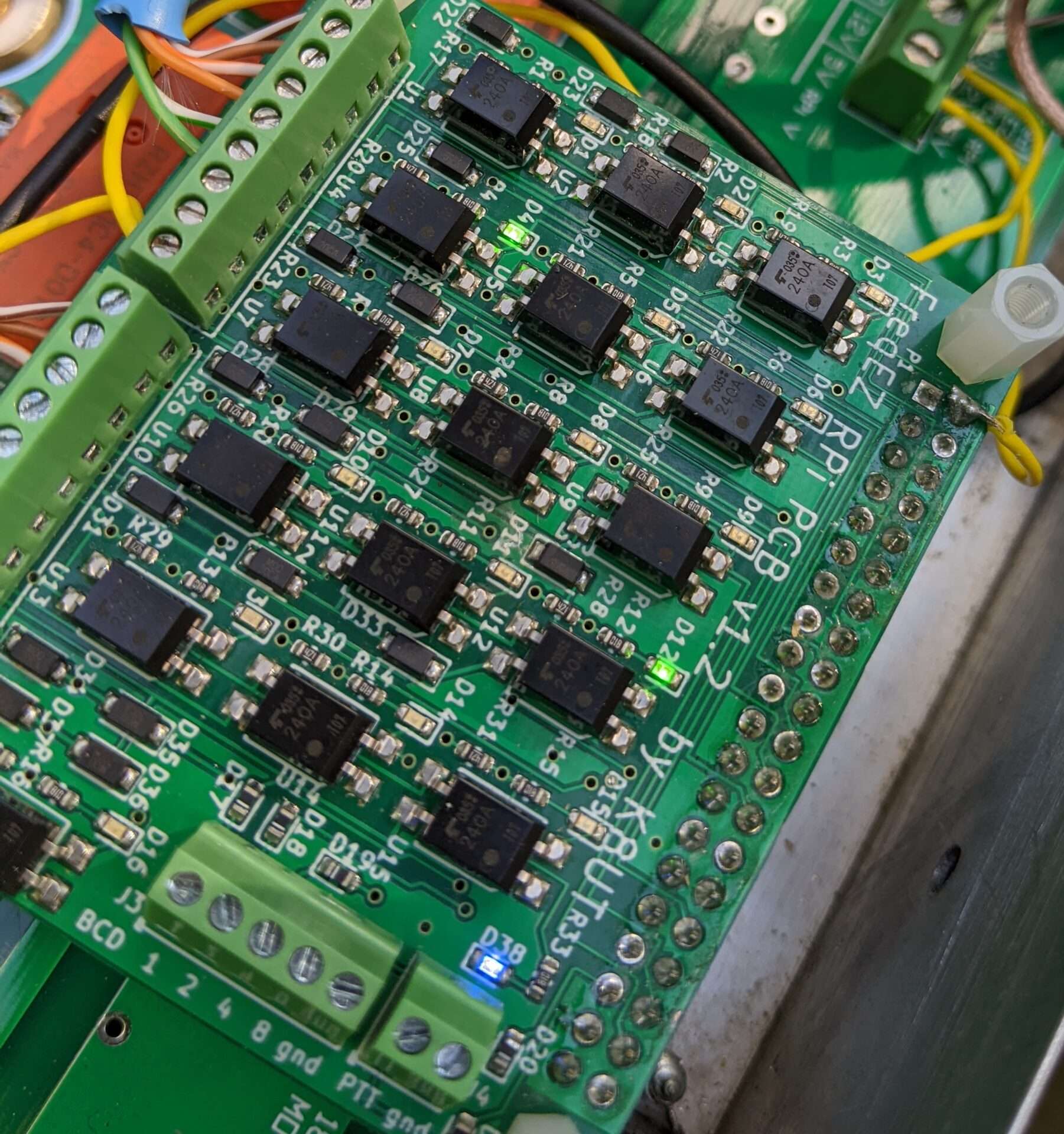
“Your high tech option”
The K8UT FreqEZ Band Decoder is now available from KK1L. It is a combination hardware/software project that provides highly configurable Band Decoding and Remote Antenna selection. For amateurs who use N1MM+, Logger32, UcxLog, Log4OM, or DXLab logging software, FreqEZ will leverage those programs’ UDP packets for antenna switching. For other amateurs, FreqEZ can connect to the BCD band outputs available from most transceivers. Without available UDP packet or BCD band information, FreqEZ can also be used as a sophisticated manual antenna switch.
Key Features
- The FreqEZ software is free
- Inexpensive, off-the-shelf, readily available hardware
- No DIP switches, diodes, solder-bridges. All configuration is via software settings
- Manual OR Automatic operation
- Manual antenna selection with simple mouse clicks in the Windows FreqEZ Console
- Automatic antenna selection from network-based UDP packets or hard-wired BCD inputs
- In N1MM+ – use the antenna numbers from the Configurer >Antenna table
- Supports the N1MM+ Keyboard Shortcut for multiple antennas per band by toggling <alt>+F9
- In Logger 32, DXLab, Log4OM, UcxLog, TR4Win or N1MM+ – use the Tx radio frequency from the UDP RadioInfo packet
- Auto-magic switching (no re-configuration) from N1MM’s antenna numbers to Logger32 (v4.0 or lter), TR4W (v4.100.10 or later), or DXLab Commander’s Frequencies
- Hard-wired method, for logging programs that do not support UDP broadcasts
- Connect to a transceiver’s BCD output jack
- OR… use BCD signals from a PC LPT parallel port (supported by some logging programs – ugh!)
- In N1MM+ – use the antenna numbers from the Configurer >Antenna table
- Single Op Profiles in the Setup window for SO1V, SO2V or SO2R configurations
- Separate antenna configurations for Radio1 versus Radio2 when operating SO2V or SO2R
- The FreqEZ Console and the FreqEZ Controller communicate via WiFi or wired Ethernet connections
- The Raspberry Pi FreqEZ Controller operates “headless” – can be located anywhere
- Each Raspberry Pi FreqEZ Controller contains 8 (HAT8 card) or 16 (HAT16) outputs
- The FreqEZ HAT Controller provides bi-directional opto-MOSFET solid-state devices that can each handle 20 volts AC/DC at 500 milliamperes
- The FreqEZ DIY Controller provides either 8 or 16 “dry contacts” that sink (ground) or source (+12 vdc) in any combination from a variety of available relay boards
Software required to use FreqEZ
Copyright
This software is copyrighted freeware. You can use, modify, and distribute the software provided that you offer it and any derivative works as freeware. Any commercial use must be approved in writing by the author.
Disclaimer
This software controls equipment that could be damaged by said software. You are responsible for installing, configuring, testing and ensuring that the software performs properly in your environment. The author cannot be held liable for any direct, indirect, consequential or incidental damages to other pieces of software, equipment, goods or persons arising from the use of this software. By downloading this software you accept the above terms of copyright and disclaimer.
FreqEZ v2.2.0 Windows Console – software to be installed on each computer accessing the FreqEZ
Standard Windows setup program:
Download and unzip this ZIP archive. Then run the setup executable:
FreqEZ Windows Console: FreqEZ WinConsole_v2.2.0.zip
FreqEZ v2.2.0 Raspberry Pi Controller – software to be installed on the Raspberry Pi connected to the FreqEZ
Burn microSD Disk Method (RECOMMENDED):
- Raspberry Pi Imager – for creating the Raspbian operating system image to the microSD card. Follow instructions below
- Launch Raspberry Pi Imager
- Click the APP OPTIONS button at bottom of the window (the white button with the red outline)
- Under Content Repository choose Use custom URL
- enter: https://freqez.kk1l.com/imager.json
- press APPLY & RESTART
- Choose the Device Setup step (should be already selected on left)
- Scroll to the very bottom and double-click No filtering
(or select and press NEXT)
- Scroll to the very bottom and double-click No filtering
- Double-click FreqEZ Trixie Custom at the top of the list
(or select and press NEXT) - Choose the storage device (microSD) to write
- For Customisation steps enter a hostname, locale, username, password, WiFi SSID, passphrase
- Leave “Capital city” as is…it does not matter
- ENABLE SSH!
- Proceed to write the image to your SD card
- The IMG file will be automatically downloaded and burnt to the micro SD card
Manual File Copy Method (ALTERNATE for “experts”, but don’t just choose this because you are an expert! …there are gotcas here):
- The files in this FreqEZ RPi Controller ZIP archive can be downloaded and manually copied to specific locations within the Raspberry Pi file structure.
- Step-by-step instructions can be found in the “APPENDIX: Alternative Method for Preparing the microSD Card” section of the documentation by clicking on Help in the v2.2.0 Windows Console or opening the on-line Help file FreqEZhelp.pdf.
- FreqEZ Raspberry Pi Controller FOR BULLSEYE or earlier!!: FreqEZ_RPiController_v2.2.0.zip
- FreqEZ Raspberry Pi Controller FOR BOOKWORM or later!!: FreqEZ_RPiController_v2.3.0.zip
FreqEZ v2.2.0 Help PDF file
FreqEZ Documentation / Help file: FreqEZhelp.pdf
README – Trouble with Debian TRIXIE FreqEZ Installations!!
Folks, If you run into an error where “libcrypto.so.1.1” is not found. Please use this newly compliled version of “freqezrpi”. The lastest version of Raspbian (RPi Debian), Bookworm & Trixie use a different library. You can also choose to burn a new SD card using the instructions in the above twistie. This is one of the “gotchas” using the expert method of install.